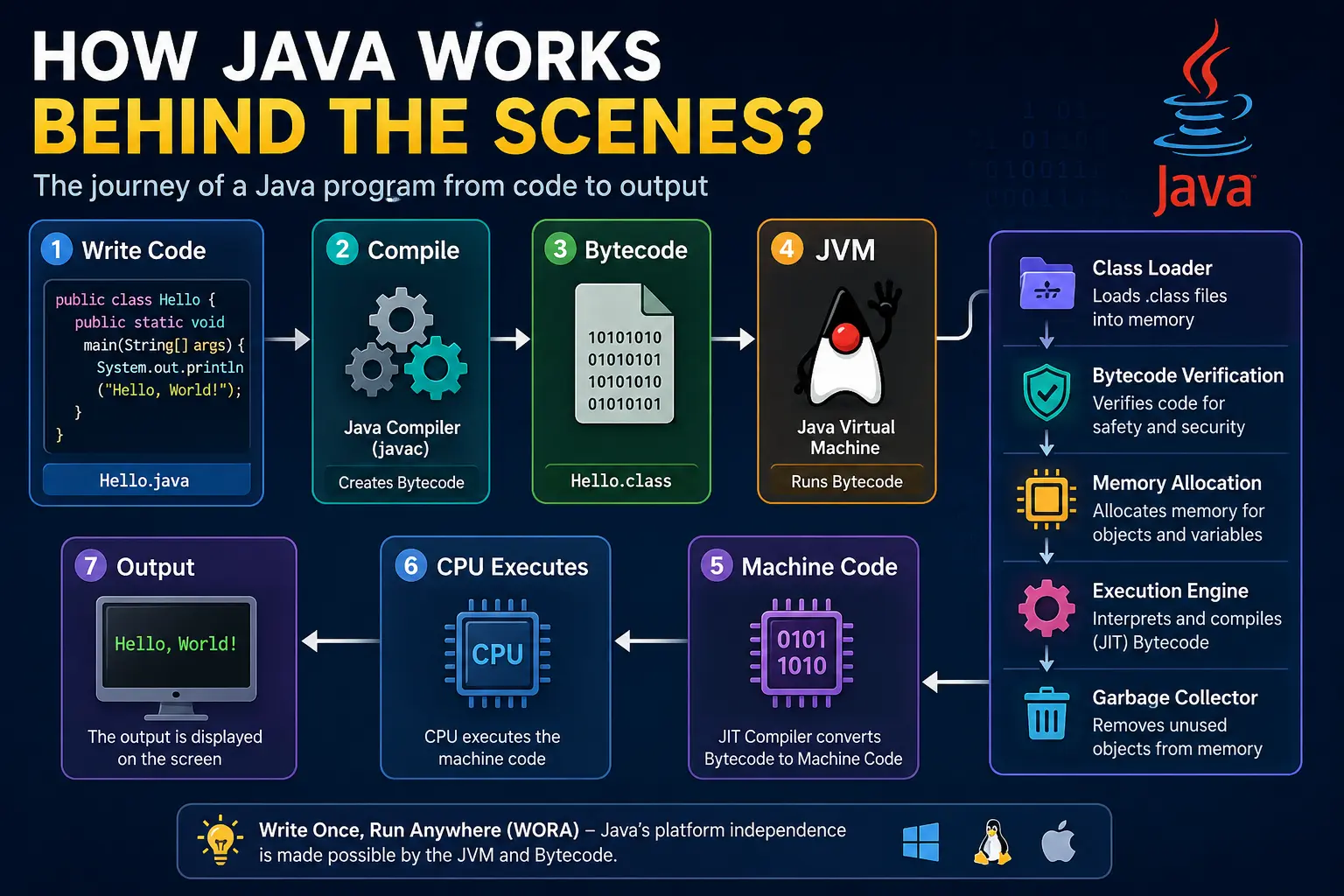
Have you ever wondered what actually happens after you write a Java program and click the Run button?
Does the computer understand Java code directly?
The answer is No.
Computers only understand machine language (binary - 0s and 1s), while Java is a high-level programming language designed for humans. Therefore, your Java code must go through several steps before the computer can execute it.
In this chapter, we will explore the complete journey of a Java program—from writing the code to seeing the final output on your screen. Understanding this process will help you build a strong foundation for learning Java and make debugging much easier in the future.
A Real-World Analogy
Imagine you are writing a letter in English to a friend who only understands Japanese.
You write the letter in English because that is the language you know best.
Before your friend can read it, the letter must be translated into Japanese.
Only after the translation can your friend understand the message.
Similarly,
-
You write code in Java.
-
The Java Compiler converts it into Bytecode.
-
The JVM translates that Bytecode into Machine Code.
-
Finally, the CPU executes the Machine Code.
Without this translation process, the computer would never understand your Java program.
Step 1: Writing the Java Source Code
Every Java application starts with source code.
The source code is written in a file that ends with the .java extension.
For example:
public class Hello {
    public static void main(String[] args) {
        System.out.println("Hello, World!");
    }
}
This file is called Hello.java.
The source code contains instructions written in Java syntax, which is easy for humans to read and understand.
However, the CPU cannot execute this code directly.
Step 2: Compilation
The next step is Compilation.
Compilation is the process of converting Java source code into Bytecode.
This is done by the Java Compiler, whose command is:
javac Hello.java
The compiler checks your program for:
-
Syntax errors
-
Missing classes
-
Incorrect method calls
-
Type mismatches
-
Invalid Java statements
If there are errors, the compiler stops and displays error messages.
If everything is correct, it generates a new file:
Hello.class
This .class file contains Bytecode.
What is Bytecode?
Bytecode is a special intermediate language generated by the Java Compiler.
It is not machine code.
It is also not Java source code.
Instead, Bytecode is a platform-independent set of instructions that can be executed by any Java Virtual Machine (JVM).
Because every operating system has its own JVM, the same Bytecode can run on different platforms without modification.
This is the reason Java follows the famous principle:
Write Once, Run Anywhere (WORA)
Real-World Example of Bytecode
Imagine you create a PDF document.
The document itself does not depend on Windows, Linux, macOS, Android, or iPhone.
As long as each device has a PDF reader, the same file can be opened everywhere.
Similarly,
-
The .class file is like the PDF.
-
The JVM is like the PDF reader.
-
Every operating system has its own JVM, allowing the same Bytecode to run on multiple platforms.
Step 3: Class Loading
Before execution begins, the JVM must load the required classes into memory.
This task is handled by the Class Loader.
The Class Loader:
-
Finds the
.classfiles. -
Loads them into memory.
-
Loads Java's built-in classes when required.
-
Avoids loading the same class multiple times.
Without the Class Loader, the JVM would not know where to find your program or the Java libraries it depends on.
Step 4: Bytecode Verification
Security is one of Java's strongest features.
Before executing any Bytecode, the JVM checks whether it is safe.
This process is called Bytecode Verification.
The verifier ensures that:
-
The Bytecode follows Java rules.
-
Memory is accessed safely.
-
There are no illegal instructions.
-
The program has not been corrupted or maliciously modified.
If the Bytecode fails verification, the JVM refuses to execute it.
This helps protect your system from harmful or invalid code.
Step 5: Memory Allocation
Once the Bytecode is verified, the JVM allocates memory for the program.
The JVM organizes memory into different areas, such as:
-
Heap Memory
-
Stack Memory
-
Method Area
-
Program Counter Register
-
Native Method Stack
Each area has a specific responsibility.
For example:
-
Objects are stored in the Heap.
-
Method calls and local variables are stored in the Stack.
We will study these memory areas in detail in later chapters.
Step 6: Execution by the Execution Engine
Now comes the most important part.
The Execution Engine is responsible for running the Bytecode.
It can execute Bytecode in two ways:
1. Interpreter
The Interpreter reads one Bytecode instruction at a time and executes it.
This approach is simple but can be slower because frequently used instructions are interpreted repeatedly.
2. JIT (Just-In-Time) Compiler
To improve performance, the JVM includes a JIT Compiler.
Instead of interpreting the same Bytecode again and again, the JIT Compiler converts frequently used Bytecode into native machine code.
The compiled machine code is stored in memory.
The next time the same code runs, the JVM executes the machine code directly, making the application much faster.
This is one of the reasons modern Java applications perform exceptionally well.
Real-Life Example of the JIT Compiler
Imagine you are solving the same math problem every day.
Initially, you calculate the answer manually.
After solving it many times, you memorize the answer.
From then on, you answer instantly without recalculating.
The JIT Compiler works in the same way.
It identifies frequently executed code, compiles it into machine code once, and reuses it for faster execution.
Step 7: Machine Code Execution
After the JIT Compiler converts Bytecode into machine code, the CPU executes it directly.
Now the processor understands every instruction.
The program finally produces the desired output.
For our example:
System.out.println("Hello, World!");
The output becomes:
Hello, World!
This is the result you see in the console.
Step 8: Garbage Collection
While your program is running, many objects are created.
Some objects are no longer needed after use.
Instead of asking programmers to free memory manually, Java automatically removes unused objects.
This process is called Garbage Collection.
The Garbage Collector runs in the background and:
-
Identifies unused objects.
-
Frees their memory.
-
Prevents memory leaks.
-
Improves application stability.
Automatic memory management is one of Java's biggest advantages over many older programming languages.
Complete Java Execution Flow
The complete process can be summarized as follows:
Write Java Source Code (.java)
            │
            ▼
      Java Compiler (javac)
            │
            ▼
     Bytecode (.class File)
            │
            ▼
        Class Loader
            │
            ▼
    Bytecode Verification
            │
            ▼
      JVM Memory Allocation
            │
            ▼
      Execution Engine
      (Interpreter + JIT)
            │
            ▼
       Machine Code
            │
            ▼
      CPU Executes Code
            │
            ▼
           Output
            │
            ▼
     Garbage Collector Frees Memory
Why This Process Makes Java Portable
Unlike languages such as C or C++, Java programs are not compiled directly into machine code.
Instead, Java generates Bytecode.
Since every operating system has its own JVM, the same Bytecode can run on Windows, Linux, macOS, or any other platform without recompilation.
This is why Java applications are highly portable and widely used in enterprise software, Android development, banking systems, cloud services, and large-scale web applications.
Everyday Example
Think about streaming a movie on an OTT platform.
The movie file stored on the server is the same for everyone.
However, different devices—such as Android phones, iPhones, Smart TVs, Windows laptops, and tablets—have their own media players that decode and play the video.
Similarly:
-
Your Java code is written once.
-
It is compiled into Bytecode.
-
Each operating system has its own JVM.
-
The JVM converts the Bytecode into machine code suitable for that operating system.
-
The user gets the same result regardless of the platform.
Key Points to Remember
-
Java source code is written in
.javafiles. -
The Java Compiler (
javac) converts source code into Bytecode. -
Bytecode is stored in
.classfiles. -
The Class Loader loads required classes into memory.
-
The Bytecode Verifier ensures the code is safe to execute.
-
The JVM allocates memory for objects, methods, and execution.
-
The Execution Engine runs the program using the Interpreter and JIT Compiler.
-
The JIT Compiler converts frequently used Bytecode into native machine code for better performance.
-
The CPU executes the machine code.
-
The Garbage Collector automatically removes unused objects from memory.
-
This entire process enables Java's Write Once, Run Anywhere (WORA) capability.
Conclusion
Behind every Java program is a carefully designed execution process that makes Java secure, portable, and efficient. From writing source code and compiling it into Bytecode to loading classes, verifying code, executing instructions with the JVM, optimizing performance through the JIT Compiler, and automatically managing memory with the Garbage Collector, every step plays an important role. Understanding how Java works behind the scenes will help you write better programs, debug issues more effectively, and appreciate why Java remains one of the most popular programming languages in the world.