🔍
R
Rohan Kumar
Posted on Aug 05, 2026 • ExpressJS

JWT Authentication Middleware (Using HTTP-Only Cookies)

npm install jsonwebtoken cookie-parser
const express = require("express");
const cookieParser = require("cookie-parser");

const app = express();

app.use(express.json());
app.use(cookieParser());

app.use("/api", require("./routes"));

module.exports = app;
PORT=5000

JWT_SECRET=your_super_secret_key_here
JWT_EXPIRES_IN=7d

NODE_ENV=development
const jwt = require("jsonwebtoken");

const token = jwt.sign(
    {
        userId: user._id,
        email: user.email,
        role: user.role
    },
    process.env.JWT_SECRET,
    {
        expiresIn: process.env.JWT_EXPIRES_IN
    }
);
res.cookie("token", token, {
    httpOnly: true,
    secure: process.env.NODE_ENV === "production",
    sameSite: "strict",
    maxAge: 7 * 24 * 60 * 60 * 1000
});

return res.status(200).json({
    success: true,
    message: "Login successful"
});
const jwt = require("jsonwebtoken");

const authMiddleware = (req, res, next) => {
    try {
        const token = req.cookies.token;

        if (!token) {
            return res.status(401).json({
                success: false,
                message: "Authentication required."
            });
        }

        const decoded = jwt.verify(
            token,
            process.env.JWT_SECRET
        );

        req.user = decoded;

        next();

    } catch (error) {

        if (error.name === "TokenExpiredError") {
            return res.status(401).json({
                success: false,
                message: "Session expired."
            });
        }

        if (error.name === "JsonWebTokenError") {
            return res.status(401).json({
                success: false,
                message: "Invalid authentication token."
            });
        }

        return res.status(500).json({
            success: false,
            message: "Internal Server Error"
        });
    }
};

module.exports = authMiddleware;
const express = require("express");
const authMiddleware = require("../middleware/auth.middleware");

const router = express.Router();

router.get("/profile", authMiddleware, (req, res) => {

    res.status(200).json({
        success: true,
        user: req.user
    });

});

module.exports = router;
const logout = (req, res) => {

    res.clearCookie("token", {
        httpOnly: true,
        secure: process.env.NODE_ENV === "production",
        sameSite: "strict"
    });

    res.status(200).json({
        success: true,
        message: "Logged out successfully."
    });

};

module.exports = logout;
const jwt = require("jsonwebtoken");

const login = async (req, res) => {

    const user = {
        _id: "68783b4a25d9ab1",
        email: "rohan@example.com",
        role: "user"
    };

    const token = jwt.sign(
        {
            userId: user._id,
            email: user.email,
            role: user.role
        },
        process.env.JWT_SECRET,
        {
            expiresIn: process.env.JWT_EXPIRES_IN
        }
    );

    res.cookie("token", token, {
        httpOnly: true,
        secure: process.env.NODE_ENV === "production",
        sameSite: "strict",
        maxAge: 7 * 24 * 60 * 60 * 1000
    });

    return res.status(200).json({
        success: true,
        message: "Login successful."
    });

};

module.exports = login;
router.get("/dashboard", authMiddleware, (req, res) => {

    console.log(req.user.userId);
    console.log(req.user.email);
    console.log(req.user.role);

    res.json({
        success: true,
        user: req.user
    });

});
project/
│
├── middleware/
│   └── auth.middleware.js
│
├── controllers/
│   ├── login.controller.js
│   └── logout.controller.js
│
├── routes/
│   └── index.js
│
├── app.js
├── server.js
└── .env

JWT (JSON Web Token) is one of the most popular methods for authenticating users in modern web applications. Instead of storing session data on the server, JWT stores user information inside a signed token that can be...

Read Full Documentation →
R
Rohan Kumar
Posted on Aug 05, 2026 • ReactJS

Interactive 3D Glassmorphism Card Component in React | Tilt Effect & Copy Button

import { useRef } from "react";
import "./GlassCard.css";

const GlassCard = ({
  image,
  badge,
  category,
  readTime,
  title,
  description,
  author,
  date,
  snippet,
}) => {
  const cardRef = useRef(null);
  const glareRef = useRef(null);
  const buttonRef = useRef(null);

  const handleMouseMove = (e) => {
    const card = cardRef.current;
    const glare = glareRef.current;

    const rect = card.getBoundingClientRect();

    const x = e.clientX - rect.left;
    const y = e.clientY - rect.top;

    const centerX = rect.width / 2;
    const centerY = rect.height / 2;

    const rotateX = ((y - centerY) / centerY) * -12;
    const rotateY = ((x - centerX) / centerX) * 12;

    card.style.transform = `rotateX(${rotateX}deg) rotateY(${rotateY}deg)`;

    glare.style.opacity = "1";
    glare.style.background = `radial-gradient(circle at ${x}px ${y}px, rgba(255,255,255,.18), transparent 60%)`;
  };

  const handleMouseLeave = () => {
    cardRef.current.style.transform = "rotateX(0deg) rotateY(0deg)";
    glareRef.current.style.opacity = "0";
  };

  const copyCode = async (e) => {
    e.stopPropagation();

    try {
      await navigator.clipboard.writeText(snippet);

      const btn = buttonRef.current;
      const text = btn.querySelector(".btn-text");
      const icon = btn.querySelector(".btn-icon");

      text.textContent = "Copied!";
      icon.textContent = "✅";
      btn.classList.add("copied");

      setTimeout(() => {
        text.textContent = "Copy Code";
        icon.textContent = "📋";
        btn.classList.remove("copied");
      }, 2000);
    } catch (err) {
      console.log(err);
    }
  };

  return (
    <div className="card-container">
      <div
        ref={cardRef}
        className="glass-card"
        onMouseMove={handleMouseMove}
        onMouseLeave={handleMouseLeave}
      >
        <div ref={glareRef} className="card-glare"></div>

        <div className="card-image-wrap">
          <img src={image} alt={title} className="card-img" />
          <span className="badge-tag">{badge}</span>
        </div>

        <div className="card-content">
          <div className="card-meta">
            <span className="meta-item">{category}</span>
            <span className="meta-item">{readTime}</span>
          </div>

          <h2 className="card-title">{title}</h2>

          <p className="card-description">{description}</p>

          <div className="card-footer">
            <div className="author-info">
              <div className="author-avatar">
                {author.charAt(0).toUpperCase()}
              </div>

              <div>
                <div className="author-name">{author}</div>
                <div className="post-date">{date}</div>
              </div>
            </div>

            <button
              ref={buttonRef}
              className="btn-copy"
              onClick={copyCode}
            >
              <span className="btn-text">Copy Code</span>
              <span className="btn-icon">📋</span>
            </button>
          </div>
        </div>
      </div>
    </div>
  );
};

export default GlassCard;
/* ========================================================
   GLOBAL RESETS & GLASSLAND BACKGROUND
   ======================================================== */
* {
    margin: 0;
    padding: 0;
    box-sizing: border-box;
    font-family: 'Segoe UI', system-ui, -apple-system, sans-serif;
}

body {
    min-height: 100vh;
    display: flex;
    justify-content: center;
    align-items: center;
    background: #0B0F19;
    background-image: 
        radial-gradient(at 0% 0%, rgba(99, 102, 241, 0.18) 0px, transparent 50%),
        radial-gradient(at 100% 100%, rgba(168, 85, 247, 0.18) 0px, transparent 50%);
    overflow: hidden;
    padding: 1.5rem;
}

/* Container for 3D perspective field */
.card-container {
    perspective: 1000px;
}

/* ========================================================
   STYLISH GLASS CARD
   ======================================================== */
.glass-card {
    width: 360px;
    background: rgba(17, 24, 39, 0.7);
    backdrop-filter: blur(16px);
    -webkit-backdrop-filter: blur(16px);
    border: 1px solid rgba(255, 255, 255, 0.1);
    border-radius: 20px;
    padding: 1.25rem;
    box-shadow: 
        0 20px 40px rgba(0, 0, 0, 0.6),
        inset 0 1px 0 rgba(255, 255, 255, 0.15);
    position: relative;
    overflow: hidden;
    transform-style: preserve-3d;
    transition: transform 0.15s ease-out, box-shadow 0.3s ease;
    cursor: pointer;
}

.glass-card:hover {
    box-shadow: 
        0 30px 60px rgba(0, 0, 0, 0.8),
        0 0 30px rgba(99, 102, 241, 0.25),
        inset 0 1px 0 rgba(255, 255, 255, 0.25);
}

/* Dynamic Glare Effect Overlay */
.card-glare {
    position: absolute;
    top: 0;
    left: 0;
    width: 100%;
    height: 100%;
    pointer-events: none;
    background: radial-gradient(circle at 50% 50%, rgba(255, 255, 255, 0.15), transparent 60%);
    opacity: 0;
    transition: opacity 0.3s ease;
    z-index: 5;
}

/* ========================================================
   CARD MEDIA & BADGE
   ======================================================== */
.card-image-wrap {
    position: relative;
    width: 100%;
    height: 190px;
    border-radius: 14px;
    overflow: hidden;
    transform: translateZ(20px); /* Lift element in 3D space */
}

.card-img {
    width: 100%;
    height: 100%;
    object-fit: cover;
    transition: transform 0.5s cubic-bezier(0.4, 0, 0.2, 1);
}

.glass-card:hover .card-img {
    transform: scale(1.08);
}

.badge-tag {
    position: absolute;
    top: 12px;
    right: 12px;
    background: rgba(17, 24, 39, 0.75);
    backdrop-filter: blur(8px);
    color: #818CF8;
    font-size: 0.75rem;
    font-weight: 700;
    padding: 0.35rem 0.75rem;
    border-radius: 50px;
    border: 1px solid rgba(99, 102, 241, 0.4);
    box-shadow: 0 4px 12px rgba(0, 0, 0, 0.3);
}

/* ========================================================
   CARD TYPOGRAPHY & BODY
   ======================================================== */
.card-content {
    margin-top: 1.25rem;
    transform: translateZ(30px); /* Deeper 3D depth */
}

.card-meta {
    display: flex;
    gap: 0.75rem;
    font-size: 0.75rem;
    color: #9CA3AF;
    margin-bottom: 0.5rem;
}

.card-title {
    color: #F9FAFB;
    font-size: 1.25rem;
    font-weight: 700;
    line-height: 1.35;
    margin-bottom: 0.5rem;
    transition: color 0.2s ease;
}

.glass-card:hover .card-title {
    color: #818CF8;
}

.card-description {
    color: #9CA3AF;
    font-size: 0.85rem;
    line-height: 1.5;
    margin-bottom: 1.25rem;
    display: -webkit-box;
    -webkit-line-clamp: 3;
    -webkit-box-orient: vertical;
    overflow: hidden;
}

/* ========================================================
   FOOTER & INTERACTIVE BUTTON
   ======================================================== */
.card-footer {
    display: flex;
    align-items: center;
    justify-content: space-between;
    padding-top: 1rem;
    border-top: 1px solid rgba(255, 255, 255, 0.08);
    transform: translateZ(25px);
}

.author-info {
    display: flex;
    align-items: center;
    gap: 0.6rem;
}

.author-avatar {
    width: 34px;
    height: 34px;
    border-radius: 50%;
    background: linear-gradient(135deg, #6366F1, #A855F7);
    color: #ffffff;
    font-weight: 700;
    font-size: 0.85rem;
    display: flex;
    align-items: center;
    justify-content: center;
    border: 1px solid rgba(255, 255, 255, 0.2);
}

.author-name {
    color: #F9FAFB;
    font-size: 0.8rem;
    font-weight: 600;
}

.post-date {
    color: #6B7280;
    font-size: 0.7rem;
}

.btn-copy {
    background: linear-gradient(135deg, #6366F1, #4F46E5);
    color: #ffffff;
    border: none;
    border-radius: 8px;
    padding: 0.5rem 0.85rem;
    font-size: 0.8rem;
    font-weight: 600;
    cursor: pointer;
    display: flex;
    align-items: center;
    gap: 0.35rem;
    transition: all 0.2s cubic-bezier(0.4, 0, 0.2, 1);
    box-shadow: 0 4px 12px rgba(99, 102, 241, 0.3);
}

.btn-copy:hover {
    transform: translateY(-2px);
    box-shadow: 0 6px 16px rgba(99, 102, 241, 0.5);
}

.btn-copy:active {
    transform: translateY(0);
}

.btn-copy.copied {
    background: #10B981;
    box-shadow: 0 4px 12px rgba(16, 185, 129, 0.4);
}
import GlassCard from "./components/GlassCard";

function App() {
  return (
    <div
      style={{
        minHeight: "100vh",
        display: "flex",
        justifyContent: "center",
        alignItems: "center",
        background: "#0B0F19",
      }}
    >
      <GlassCard
        image="https://images.unsplash.com/photo-1618005182384-a83a8bd57fbe?w=600&auto=format&fit=crop&q=80"
        badge="⚡ React"
        category="📁 Components"
        readTime="⏱️ 5 min read"
        title="Reusable Glass Card"
        description="A reusable glassmorphism card component with 3D tilt effect, glare animation and copy button."
        author="Rohan Kumar"
        date="Aug 5, 2026"
        snippet="npm install react"
      />
    </div>
  );
}

export default App;
Build a beautiful 3D Glassmorphism Card component in React with mouse tilt, dynamic glare, smooth animations, and a copy-to-clipboard button.
R
Rohan Kumar
Posted on Jul 29, 2026 • HTML / CSS / JAVASCRIPT

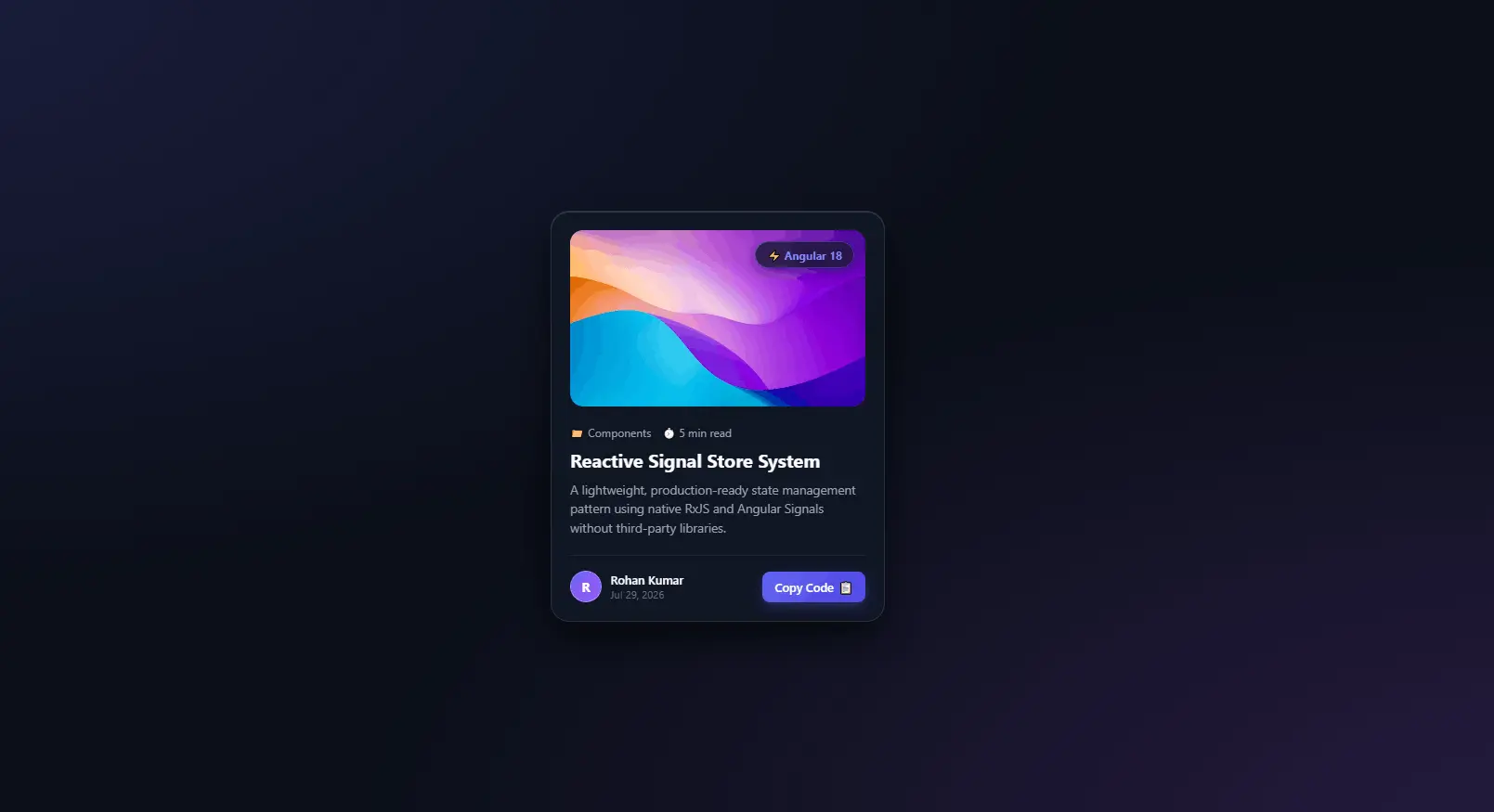
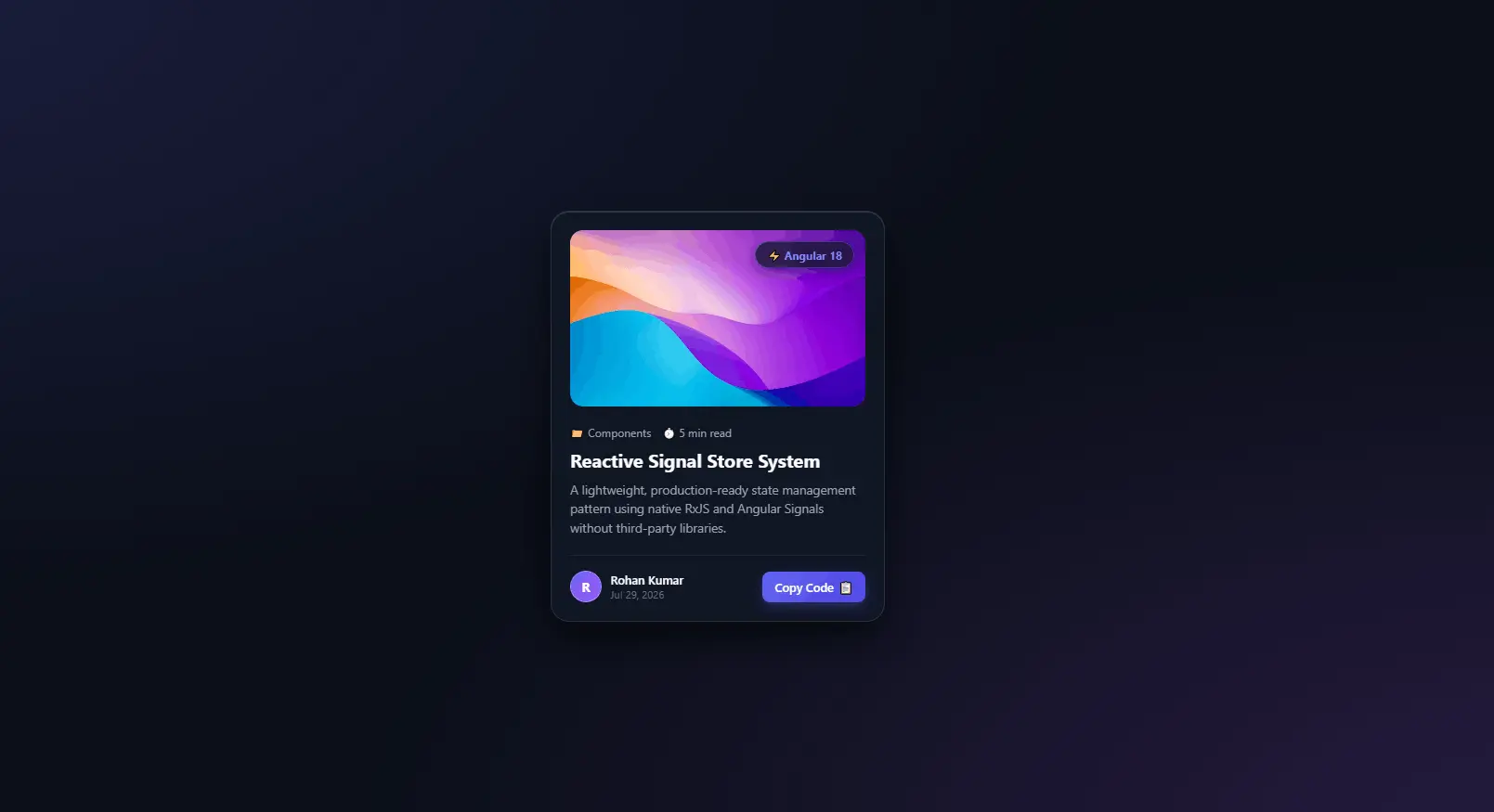
3D Tilt Glassmorphism Card with Interactive Glare & Copy Snippet

<div class="card-container">
        <div class="glass-card" id="tiltCard">
            <!-- Dynamic Glare Highlight Overlay -->
            <div class="card-glare"></div>

            <div class="card-image-wrap">
                <img src="https://images.unsplash.com/photo-1618005182384-a83a8bd57fbe?w=600&auto=format&fit=crop&q=80" alt="Abstract Art" class="card-img">
                <span class="badge-tag">⚡ Angular 18</span>
            </div>

            <div class="card-content">
                <div class="card-meta">
                    <span class="meta-item">📁 Components</span>
                    <span class="meta-item">⏱️ 5 min read</span>
                </div>

                <h2 class="card-title">Reactive Signal Store System</h2>
                <p class="card-description">
                    A lightweight, production-ready state management pattern using native RxJS and Angular Signals without third-party libraries.
                </p>

                <div class="card-footer">
                    <div class="author-info">
                        <div class="author-avatar">R</div>
                        <div>
                            <div class="author-name">Rohan Kumar</div>
                            <div class="post-date">Jul 29, 2026</div>
                        </div>
                    </div>

                    <button class="btn-copy" id="copyBtn" data-snippet="npm i @angular/core@next">
                        <span class="btn-text">Copy Code</span>
                        <span class="btn-icon">📋</span>
                    </button>
                </div>
            </div>
        </div>
    </div>
/* ========================================================
   GLOBAL RESETS & GLASSLAND BACKGROUND
   ======================================================== */
* {
    margin: 0;
    padding: 0;
    box-sizing: border-box;
    font-family: 'Segoe UI', system-ui, -apple-system, sans-serif;
}

body {
    min-height: 100vh;
    display: flex;
    justify-content: center;
    align-items: center;
    background: #0B0F19;
    background-image: 
        radial-gradient(at 0% 0%, rgba(99, 102, 241, 0.18) 0px, transparent 50%),
        radial-gradient(at 100% 100%, rgba(168, 85, 247, 0.18) 0px, transparent 50%);
    overflow: hidden;
    padding: 1.5rem;
}

/* Container for 3D perspective field */
.card-container {
    perspective: 1000px;
}

/* ========================================================
   STYLISH GLASS CARD
   ======================================================== */
.glass-card {
    width: 360px;
    background: rgba(17, 24, 39, 0.7);
    backdrop-filter: blur(16px);
    -webkit-backdrop-filter: blur(16px);
    border: 1px solid rgba(255, 255, 255, 0.1);
    border-radius: 20px;
    padding: 1.25rem;
    box-shadow: 
        0 20px 40px rgba(0, 0, 0, 0.6),
        inset 0 1px 0 rgba(255, 255, 255, 0.15);
    position: relative;
    overflow: hidden;
    transform-style: preserve-3d;
    transition: transform 0.15s ease-out, box-shadow 0.3s ease;
    cursor: pointer;
}

.glass-card:hover {
    box-shadow: 
        0 30px 60px rgba(0, 0, 0, 0.8),
        0 0 30px rgba(99, 102, 241, 0.25),
        inset 0 1px 0 rgba(255, 255, 255, 0.25);
}

/* Dynamic Glare Effect Overlay */
.card-glare {
    position: absolute;
    top: 0;
    left: 0;
    width: 100%;
    height: 100%;
    pointer-events: none;
    background: radial-gradient(circle at 50% 50%, rgba(255, 255, 255, 0.15), transparent 60%);
    opacity: 0;
    transition: opacity 0.3s ease;
    z-index: 5;
}

/* ========================================================
   CARD MEDIA & BADGE
   ======================================================== */
.card-image-wrap {
    position: relative;
    width: 100%;
    height: 190px;
    border-radius: 14px;
    overflow: hidden;
    transform: translateZ(20px); /* Lift element in 3D space */
}

.card-img {
    width: 100%;
    height: 100%;
    object-fit: cover;
    transition: transform 0.5s cubic-bezier(0.4, 0, 0.2, 1);
}

.glass-card:hover .card-img {
    transform: scale(1.08);
}

.badge-tag {
    position: absolute;
    top: 12px;
    right: 12px;
    background: rgba(17, 24, 39, 0.75);
    backdrop-filter: blur(8px);
    color: #818CF8;
    font-size: 0.75rem;
    font-weight: 700;
    padding: 0.35rem 0.75rem;
    border-radius: 50px;
    border: 1px solid rgba(99, 102, 241, 0.4);
    box-shadow: 0 4px 12px rgba(0, 0, 0, 0.3);
}

/* ========================================================
   CARD TYPOGRAPHY & BODY
   ======================================================== */
.card-content {
    margin-top: 1.25rem;
    transform: translateZ(30px); /* Deeper 3D depth */
}

.card-meta {
    display: flex;
    gap: 0.75rem;
    font-size: 0.75rem;
    color: #9CA3AF;
    margin-bottom: 0.5rem;
}

.card-title {
    color: #F9FAFB;
    font-size: 1.25rem;
    font-weight: 700;
    line-height: 1.35;
    margin-bottom: 0.5rem;
    transition: color 0.2s ease;
}

.glass-card:hover .card-title {
    color: #818CF8;
}

.card-description {
    color: #9CA3AF;
    font-size: 0.85rem;
    line-height: 1.5;
    margin-bottom: 1.25rem;
    display: -webkit-box;
    -webkit-line-clamp: 3;
    -webkit-box-orient: vertical;
    overflow: hidden;
}

/* ========================================================
   FOOTER & INTERACTIVE BUTTON
   ======================================================== */
.card-footer {
    display: flex;
    align-items: center;
    justify-content: space-between;
    padding-top: 1rem;
    border-top: 1px solid rgba(255, 255, 255, 0.08);
    transform: translateZ(25px);
}

.author-info {
    display: flex;
    align-items: center;
    gap: 0.6rem;
}

.author-avatar {
    width: 34px;
    height: 34px;
    border-radius: 50%;
    background: linear-gradient(135deg, #6366F1, #A855F7);
    color: #ffffff;
    font-weight: 700;
    font-size: 0.85rem;
    display: flex;
    align-items: center;
    justify-content: center;
    border: 1px solid rgba(255, 255, 255, 0.2);
}

.author-name {
    color: #F9FAFB;
    font-size: 0.8rem;
    font-weight: 600;
}

.post-date {
    color: #6B7280;
    font-size: 0.7rem;
}

.btn-copy {
    background: linear-gradient(135deg, #6366F1, #4F46E5);
    color: #ffffff;
    border: none;
    border-radius: 8px;
    padding: 0.5rem 0.85rem;
    font-size: 0.8rem;
    font-weight: 600;
    cursor: pointer;
    display: flex;
    align-items: center;
    gap: 0.35rem;
    transition: all 0.2s cubic-bezier(0.4, 0, 0.2, 1);
    box-shadow: 0 4px 12px rgba(99, 102, 241, 0.3);
}

.btn-copy:hover {
    transform: translateY(-2px);
    box-shadow: 0 6px 16px rgba(99, 102, 241, 0.5);
}

.btn-copy:active {
    transform: translateY(0);
}

.btn-copy.copied {
    background: #10B981;
    box-shadow: 0 4px 12px rgba(16, 185, 129, 0.4);
}
document.addEventListener('DOMContentLoaded', () => {
    const card = document.getElementById('tiltCard');
    const glare = card.querySelector('.card-glare');
    const copyBtn = document.getElementById('copyBtn');

    /* ========================================================
       1. 3D MOUSE TILT & GLARE EFFECT
       ======================================================== */
    card.addEventListener('mousemove', (e) => {
        const rect = card.getBoundingClientRect();
        
        // Calculate mouse position relative to card center (-1 to 1)
        const x = e.clientX - rect.left;
        const y = e.clientY - rect.top;
        
        const centerX = rect.width / 2;
        const centerY = rect.height / 2;
        
        const rotateX = ((y - centerY) / centerY) * -12; // Max 12deg tilt
        const rotateY = ((x - centerX) / centerX) * 12;

        // Apply 3D rotation transform
        card.style.transform = `rotateX(${rotateX}deg) rotateY(${rotateY}deg)`;

        // Adjust dynamic glare position & intensity
        glare.style.opacity = '1';
        glare.style.background = `radial-gradient(circle at ${x}px ${y}px, rgba(255, 255, 255, 0.18), transparent 60%)`;
    });

    // Reset card tilt when mouse leaves
    card.addEventListener('mouseleave', () => {
        card.style.transform = 'rotateX(0deg) rotateY(0deg)';
        glare.style.opacity = '0';
    });

    /* ========================================================
       2. INTERACTIVE COPY TO CLIPBOARD BUTTON
       ======================================================== */
    copyBtn.addEventListener('click', (e) => {
        e.stopPropagation(); // Prevent card triggers
        
        const textToCopy = copyBtn.getAttribute('data-snippet');
        
        navigator.clipboard.writeText(textToCopy).then(() => {
            const btnText = copyBtn.querySelector('.btn-text');
            const btnIcon = copyBtn.querySelector('.btn-icon');
            
            // Visual feedback update
            btnText.textContent = 'Copied!';
            btnIcon.textContent = '✅';
            copyBtn.classList.add('copied');

            // Reset back after 2 seconds
            setTimeout(() => {
                btnText.textContent = 'Copy Code';
                btnIcon.textContent = '📋';
                copyBtn.classList.remove('copied');
            }, 2000);
        }).catch(err => {
            console.error('Failed to copy text: ', err);
        });
    });
});
🔖 Bookmark saved successfully!