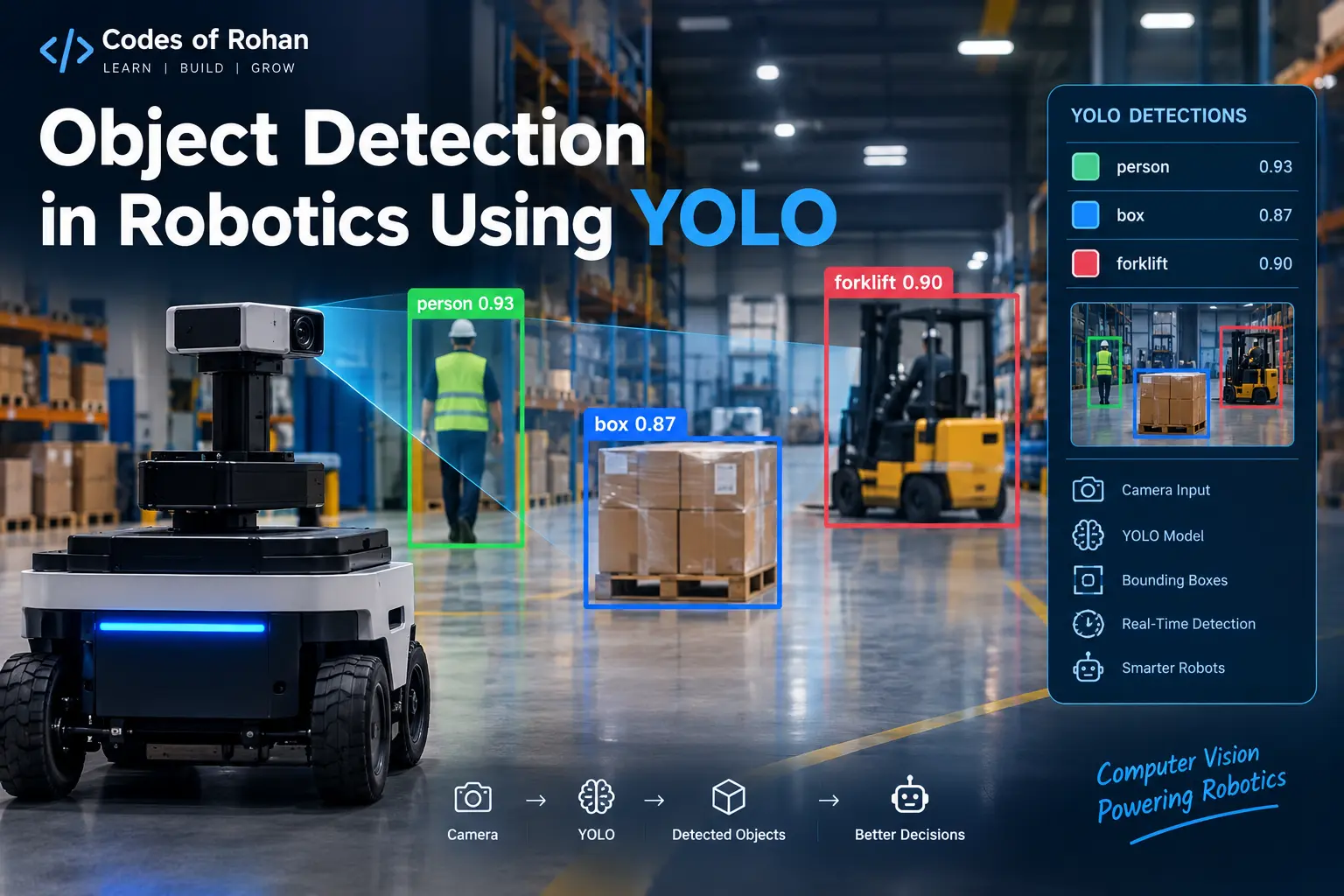
Imagine a robot moving through a warehouse.
There are boxes on the floor, people walking around, shelves on both sides, and different objects placed at different locations. The robot needs to understand what is around it before it can decide where to move or what action to perform.
A camera can capture all of these objects, but simply capturing an image is not enough.
The robot needs to answer questions like:
-
Where is the box?
-
Where is the person?
-
How many objects are present?
-
What type of object is it?
-
Where exactly is the object located in the image?
This is where object detection comes into the picture.
Object detection is one of the most important computer vision capabilities used in modern robotics. It allows a robot to identify objects and determine their locations in the camera's view.
One of the most popular families of deep-learning models used for real-time object detection is YOLO, which stands for You Only Look Once.
In this article, we will understand what object detection is, how YOLO works, why it is useful in robotics, and how a robotic system can use YOLO to understand its surroundings.
What is Object Detection?
Before understanding YOLO, let's first understand object detection.
Suppose we give a robot this image:
+--------------------------------------+
|                                      |
|       Person                         |
|        ↓                             |
|      [  👤  ]             Box        |
|                          [ 📦 ]       |
|                                      |
|              Chair                   |
|             [ 🪑 ]                   |
|                                      |
+--------------------------------------+
A human can immediately recognize the person, box, and chair.
For a computer, however, the image is simply a collection of pixels.
Object detection allows an AI system to identify:
-
What objects are present
-
Where those objects are located
For example, the model might produce:
Person → 95% confidence → Bounding Box
Box    → 91% confidence → Bounding Box
Chair  → 87% confidence → Bounding Box
The rectangle around each detected object is called a bounding box.
So, object detection combines two tasks:
Classification + Localization
Classification answers:
"What is this object?"
Localization answers:
"Where is this object?"
Object detection performs both tasks together.
What is YOLO?
YOLO stands for:
You Only Look Once
It is a family of deep-learning models designed primarily for object detection.
The important idea behind YOLO is that an image can be processed in a single overall inference process instead of repeatedly examining different regions of the image.
This makes YOLO particularly useful for applications where speed matters.
For example, consider a mobile robot moving through a factory.
If the robot detects a person:
Camera
   ↓
YOLO
   ↓
Person detected
   ↓
Robot controller
   ↓
Slow down / Stop / Change direction
The robot cannot afford to wait several seconds for every frame.
It needs to process camera images quickly.
This is one reason real-time object detection models such as YOLO are attractive for robotics.
Why is Object Detection Important in Robotics?
Robots interact with the physical world.
To interact safely and intelligently, they need information about their surroundings.
A camera provides visual information, while an object detection model converts that visual information into structured information that the robot's software can use.
For example:
Camera Image
     ↓
Object Detection
     ↓
Person detected
     ↓
Person location
     ↓
Navigation system
     ↓
Robot changes path
Consider an autonomous warehouse robot.
It might detect:
-
Human workers
-
Packages
-
Pallets
-
Forklifts
-
Shelves
-
Doors
-
Obstacles
The detection information can then be passed to other components of the robot.
This creates a perception pipeline.
How YOLO Works
At a high level, the YOLO pipeline looks like this:
Camera
   ↓
Image Frame
   ↓
Preprocessing
   ↓
YOLO Model
   ↓
Object Predictions
   ↓
Confidence Filtering
   ↓
Bounding Boxes
   ↓
Robot Decision System
Let's understand each stage.
1. Camera Captures an Image
A robot usually has one or more cameras.
The camera continuously captures frames:
Frame 1
Frame 2
Frame 3
Frame 4
...
For example:
Camera → 30 FPS
This means the camera can potentially provide 30 frames every second.
The exact frame rate depends on the camera and system configuration.
2. Image Preprocessing
The raw image may not be in exactly the format expected by the model.
The system can perform operations such as:
-
Resizing
-
Normalization
-
Format conversion
-
Tensor conversion
For example:
1920 × 1080 image
        ↓
Model input size
        ↓
YOLO
Modern YOLO implementations can handle much of this preprocessing automatically.
3. YOLO Performs Inference
The processed image is passed to the trained YOLO model.
The model analyzes the image and produces predictions.
For example:
Person   0.96
Bottle   0.91
Chair    0.88
The model also predicts where those objects are located.
A detection can conceptually be represented as:
[class, confidence, x1, y1, x2, y2]
For example:
Person
Confidence: 0.96
Bounding Box:
x1 = 220
y1 = 100
x2 = 450
y2 = 620
The coordinates describe the location of the bounding box within the image.
What is a Bounding Box?
A bounding box is a rectangle surrounding a detected object.
For example:
+-----------------------------+
|                             |
|       +-----------+         |
|       |   PERSON  |         |
|       |           |         |
|       +-----------+         |
|                             |
+-----------------------------+
The bounding box provides approximate image coordinates.
Usually, the coordinates are represented using values such as:
x1, y1, x2, y2
where:
-
x1= left coordinate -
y1= top coordinate -
x2= right coordinate -
y2= bottom coordinate
This information is extremely useful to robotics systems.
For example, if a person appears toward the left side of the camera frame, the robot may use that information as part of its navigation or tracking logic.
What is Confidence Score?
YOLO also produces a confidence score for detections.
For example:
Person → 0.94
Dog    → 0.87
Car    → 0.42
A confidence score represents how strongly the model supports a particular detection.
Robotics applications often apply a threshold.
For example:
Confidence threshold = 0.50
Then:
0.94 → Keep
0.87 → Keep
0.42 → Ignore
The threshold is application-dependent.
A safety-critical robot may need carefully validated detection behavior rather than simply relying on an arbitrary confidence value.
YOLO and Real-Time Robotics
One of the biggest advantages of YOLO-style detectors is their suitability for fast inference.
Consider a robot that needs to detect people while moving.
The system may look like:
Camera
  ↓
Frame
  ↓
YOLO
  ↓
Person detected
  ↓
Tracking / Navigation
  ↓
Robot movement
This process can repeat continuously.
The practical performance depends on:
-
Model size
-
Input resolution
-
GPU/CPU
-
Camera frame rate
-
Number of detected objects
-
Optimization techniques
-
Robotics hardware
Therefore, "real-time" does not mean every YOLO model will automatically run at real-time speed on every robot.
YOLO Model Size and Robotics Hardware
YOLO implementations are commonly available in different model sizes.
The general trade-off looks like:
Smaller Model
     ↓
Faster inference
     ↓
Lower computational requirements

Larger Model
     ↓
More computation
     ↓
Potentially better accuracy
For a small mobile robot with limited computing power, a lightweight model may be preferable.
For a powerful robotic workstation with a dedicated GPU, a larger model may be practical.
The correct choice depends on the application's requirements.
Using YOLO With a Robot Camera
A simple robotics architecture can look like this:
               ┌──────────────┐
                │    Camera    │
                └──────┬───────┘
                       ↓
                ┌──────────────┐
                │     YOLO     │
                └──────┬───────┘
                       ↓
              Detected Objects
                       ↓
          ┌────────────┴────────────┐
          ↓                         ↓
    Navigation                 Manipulation
          ↓                         ↓
    Robot Movement            Robot Arm
This is where object detection becomes much more interesting than simply drawing rectangles on an image.
YOLO is the perception component.
Other robotic systems use its output to decide what to do.
Example: Robot Detecting a Person
Suppose we have an autonomous delivery robot.
The robot's camera sees:
Person
YOLO detects:
Class: person
Confidence: 0.93
Bounding box: (x1, y1, x2, y2)
The robotics software can then determine that an object classified as a person is present.
A higher-level system might decide:
Person detected
       ↓
Estimate position
       ↓
Check robot's path
       ↓
If path is blocked
       ↓
Slow down / stop / re-plan
Notice an important distinction.
YOLO detects the object.
It does not automatically decide how the robot should behave.
The robot's navigation, control, safety and decision-making systems are separate components.
YOLO Does Not Directly Tell the Robot Distance
This is an important concept when using cameras in robotics.
Suppose YOLO detects:
Person
Bounding box
Confidence = 95%
That does not automatically mean:
Person = 2.4 meters away
A normal 2D bounding box provides image-space information.
To estimate physical distance, the robot may use additional information such as:
-
Stereo cameras
-
Depth cameras
-
LiDAR
-
Sensor fusion
-
Known object dimensions
-
Multiple-view geometry
For example:
RGB Camera ─────┐
                ├──→ Sensor Fusion → 3D Position
Depth Camera ───┘
This distinction is critical when building real robotic systems.
YOLO With Depth Cameras
Many robots use depth cameras.
A depth camera provides information about how far different points are from the camera.
Combining YOLO with depth information can produce something much more useful:
YOLO:
Person detected
        +
Depth:
Person ≈ 2.1 m away
        ↓
Robot perception system
Now the robot has both:
What is it?
and
How far away is it?
This information can be useful for navigation, object manipulation and human-robot interaction.
YOLO for Robotic Arms
YOLO is not limited to mobile robots.
It can also be used with robotic arms.
Imagine a robotic arm working on a manufacturing line.
A camera observes a table:
+----------------------------+
 |                            |
 |  🔩     📦       🔧       |
 |                            |
 +----------------------------+
YOLO detects the objects.
The robotic system can then use their image coordinates to determine where an object appears in the camera view.
However, image coordinates are not automatically robot-arm coordinates.
The system may need additional steps such as:
Camera Coordinates
        ↓
Calibration
        ↓
Robot Coordinates
        ↓
Motion Planning
        ↓
Robot Arm
This is an important robotics concept known as camera-robot calibration or hand-eye calibration, depending on the configuration.
YOLO and ROS 2
YOLO can also be integrated into a robotics middleware ecosystem such as ROS 2.
A simplified architecture might look like:
Camera Node
     ↓
Image Topic
     ↓
YOLO Detection Node
     ↓
Detection Topic
     ↓
Navigation / Planning Node
For example, the camera node publishes image messages.
The YOLO node subscribes to those images and performs inference.
It can then publish detection results.
Other ROS 2 nodes can consume those results.
This modular architecture is one of the major advantages of robotics frameworks.
Each component can focus on a specific responsibility.
Training YOLO for a Custom Robot
Pre-trained object detection models are useful, but sometimes a robot needs to detect objects that are not part of the original training dataset.
Imagine a warehouse robot that needs to recognize:
Company_Box_A
Company_Box_B
Company_Box_C
A generic model may not understand these custom categories.
In that case, you can create a custom dataset.
The typical workflow is:
Collect Images
      ↓
Annotate Objects
      ↓
Create Dataset
      ↓
Train Model
      ↓
Validate Model
      ↓
Test on Robot
      ↓
Optimize
      ↓
Deploy
During annotation, objects are marked with bounding boxes and corresponding class labels.
For example:
Image
  ↓
Bounding Box
  ↓
"Box_A"
The model then learns patterns associated with those classes.
Challenges of Using YOLO in Robotics
Although YOLO is powerful, deploying object detection on a real robot introduces several challenges.
1. Lighting Conditions
A model trained primarily on bright indoor images may behave differently under:
-
Low light
-
Direct sunlight
-
Shadows
-
Reflections
Therefore, training data should represent the conditions in which the robot will operate.
2. Moving Objects
Robots often operate around moving people and vehicles.
The system needs to process changing scenes continuously.
3. Limited Computing Power
A robot may have limited CPU, GPU, memory and battery capacity.
A large model may provide more computational cost than the robot can practically support.
4. Occlusion
Objects can partially hide behind other objects.
For example:
Person A
   ↓
[Person B]
Only part of one person may be visible.
Detection performance can be affected by such situations.
5. False Positives and False Negatives
A false positive occurs when the system detects an object that isn't actually there.
A false negative occurs when an actual object is missed.
In robotics, these errors can have physical consequences.
Therefore, object detection should be evaluated within the complete robotic system rather than judged only by how good the bounding boxes look.
Object Detection Is Only One Part of Robot Intelligence
It is tempting to think:
YOLO → Intelligent Robot
But a real robot is much more complex.
A simplified autonomous robot might contain:
             Sensors
                ↓
           Perception
                ↓
        Localization / Mapping
                ↓
         Planning / Decision
                ↓
             Control
                ↓
             Actuators
                ↓
             Movement
YOLO mainly contributes to the perception layer.
It tells the robot about objects visible in its sensor data.
Other systems are responsible for understanding where the robot is, planning movement and controlling motors.
This separation is important when designing robotics software.
Future of Object Detection in Robotics
Object detection is moving beyond simply identifying objects with bounding boxes.
Modern robotics research increasingly combines vision with:
-
Language models
-
Vision-language models
-
Robot learning
-
3D perception
-
Multimodal sensor fusion
-
Vision-language-action models
-
Simulation
-
Reinforcement learning
For example, instead of simply detecting:
Cup
a future robotic system may need to understand:
"Pick up the blue cup next to the laptop."
That requires more than object detection.
The system must understand the scene, interpret language, identify the correct object, estimate its position, plan a grasp and execute the action.
This is one of the directions connecting traditional computer vision with embodied AI and modern intelligent robotics.
Conclusion
Object detection gives robots an important ability: understanding what objects are present in their visual environment and where those objects appear.
YOLO, or You Only Look Once, is a family of object detection models that can be used for fast visual inference.
A typical robotic system can combine:
Camera
   ↓
YOLO
   ↓
Object Detection
   ↓
Depth / LiDAR / Other Sensors
   ↓
Perception
   ↓
Planning
   ↓
Robot Control
YOLO itself does not make the entire robot autonomous. Instead, it provides valuable visual information that other robotic components can use.
This makes YOLO useful in many applications, including:
-
Autonomous mobile robots
-
Warehouse robots
-
Robotic arms
-
Manufacturing systems
-
Agricultural robots
-
Delivery robots
-
Service robots
-
Drones
-
Human-robot interaction
The key idea to remember is simple:
A camera gives the robot pixels. YOLO turns those pixels into detected objects. The rest of the robotics system uses that information to understand the environment and perform actions.
And that is where computer vision starts becoming a real part of robotics—not just recognizing an object on a screen, but helping a machine interact with the physical world.