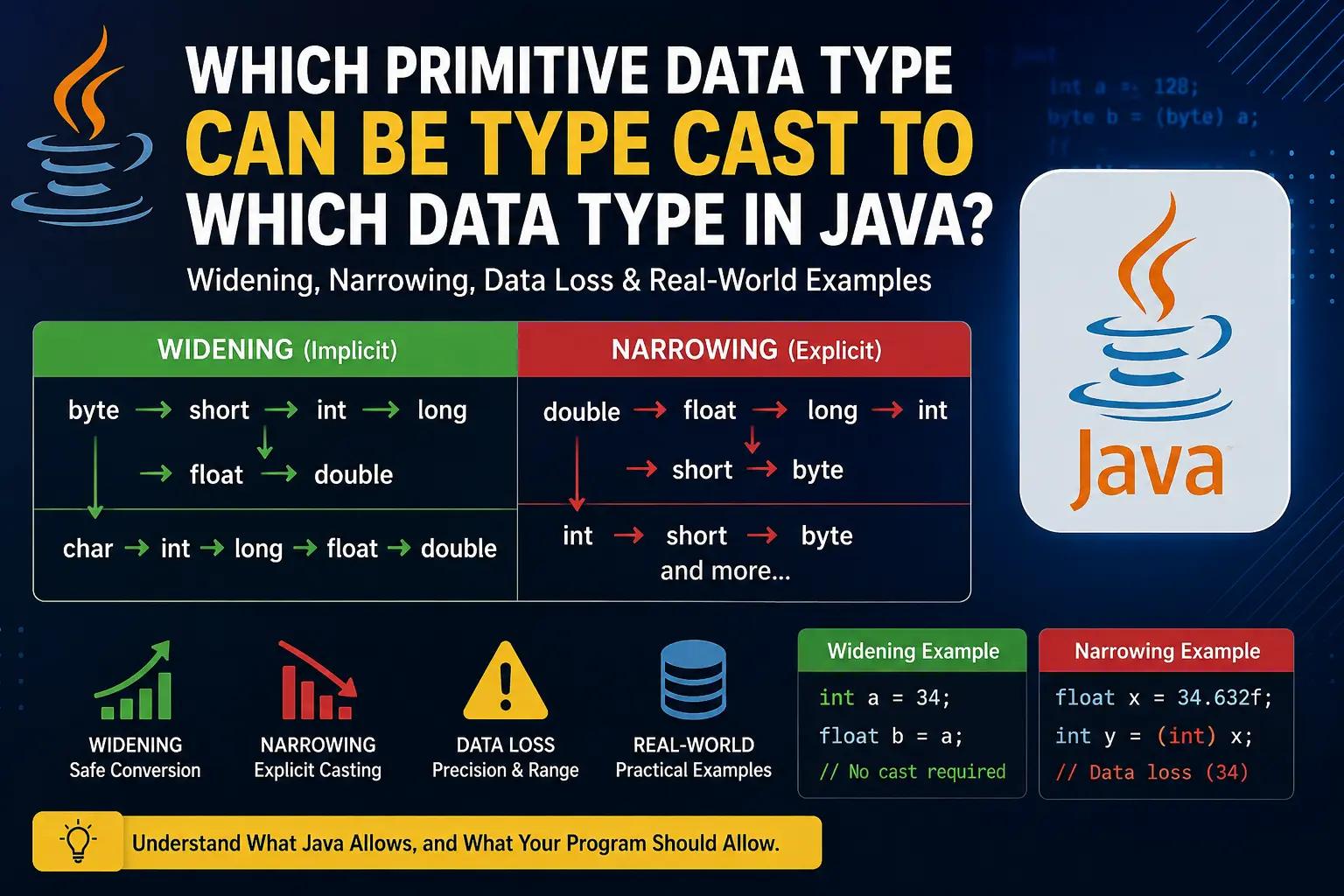
Type casting is an important concept in Java because sometimes we need to convert a value from one primitive data type to another.
For example, an int can be converted to a long, while a double can be converted to an int. However, not every primitive data type can be converted to every other primitive data type.
More importantly, some conversions can cause data loss, precision loss, overflow, or unexpected results.
In this article, we will understand:
-
Which primitive data types can be converted to which other types
-
Widening and narrowing conversions
-
Which conversions happen automatically
-
Which conversions require explicit casting
-
Where data loss can occur
-
Why
booleancannot be cast to numeric types -
Real-world examples of why careless casting can be dangerous
Primitive Data Types in Java
Java has eight primitive data types:
| Data Type | Size | General Purpose |
|---|---|---|
byte |
8 bits | Small integer |
short |
16 bits | Integer |
int |
32 bits | Integer |
long |
64 bits | Large integer |
float |
32 bits | Decimal number |
double |
64 bits | More precise decimal number |
char |
16 bits | Character / UTF-16 code unit |
boolean |
JVM-dependent | true / false |
The numeric primitive types can be broadly divided into:
Integral Types:
byte → short → int → long
char

Floating-Point Types:
float → double

Boolean:
boolean
1. Widening Conversion
A widening conversion happens when a value is converted from a type that can represent a smaller range or set of values to a type that can represent it more broadly.
For example:
int a = 100;
long b = a;
Here, the int value is converted to long.
Java can perform this conversion automatically:
int a = 100;
long b = a;
You do not need:
long b = (long) a;
Although explicitly writing the cast is possible, it is normally unnecessary.
2. Widening Conversion Order
For the integer types, the commonly used widening path is:
byte
  ↓
short
  ↓
int
  ↓
long
  ↓
float
  ↓
double
There is also a widening path from char to:
char → int → long → float → double
However, there is an important point:
Widening does not always mean that every possible value can be represented exactly.
For example, converting a very large long to float is allowed, but a float has limited precision. Therefore, some integer values may not remain exactly representable.
3. Widening Conversion Examples
byte → short
byte a = 100;
short b = a;
No explicit cast is required.
byte → int
byte a = 100;
int b = a;
byte → long
byte a = 100;
long b = a;
int → long
int a = 100000;
long b = a;
int → float
int a = 100;
float b = a;
The result will be:
100.0
int → double
int a = 100;
double b = a;
The result will be:
100.0
float → double
float a = 12.5f;
double b = a;
This is also allowed automatically.
4. Narrowing Conversion
Now consider the opposite direction.
Suppose we have:
double price = 99.99;
and we want to store it in an int:
int amount = price;
Java does not allow this automatically.
We have to explicitly tell Java that we want the conversion:
int amount = (int) price;
This is called narrowing conversion or explicit type casting.
5. Primitive Type Casting Chart
A useful way to remember the common primitive conversions is:
| From | Can Widen To |
|---|---|
byte |
short, int, long, float, double |
short |
int, long, float, double |
char |
int, long, float, double |
int |
long, float, double |
long |
float, double |
float |
double |
double |
— |
boolean |
No numeric primitive type |
Narrowing conversions can also be explicitly performed in the reverse direction where Java defines the conversion.
For example:
double → float
double → long
double → int
double → short
double → byte

float → long
float → int
float → short
float → byte

long → int
long → short
long → byte

int → short
int → byte

short → byte
And:
int → char
long → char
short → char
byte → char
float → char
double → char
can also be performed using explicit casting where Java permits the conversion.
6. Why Does Java Require Explicit Casting?
Imagine you have a bottle containing:
1 litre
and another container that can hold:
5 litres
Moving 1 litre into the 5-litre container is safe.
But now imagine you have:
5 litres
and try to put it into a:
1 litre
container.
Something has to happen to the extra water.
The same idea applies to narrowing conversions.
For example:
double price = 99.99;
int amount = (int) price;
The int cannot store the .99 fractional portion.
Therefore:
99.99 → 99
The decimal portion is discarded.
Java requires the explicit cast because you are asking it to perform a conversion that may lose information.
7. Data Loss When Converting double to int
Consider:
double price = 99.99;
int amount = (int) price;

System.out.println(amount);
Output:
99
Notice that Java does not round:
99.99 → 100
Instead, the fractional part is truncated:
99.99 → 99
The same happens with:
double value = 99.999;
int result = (int) value;
Result:
99
8. Real-World Example: Money and Prices
This is particularly important when dealing with money.
Suppose an online shopping application calculates:
double price = 999.99;
If you do:
int priceInRupees = (int) price;
you get:
999
You have lost:
₹0.99
That might look small for one transaction, but imagine performing this conversion across thousands or millions of transactions.
Therefore, blindly casting monetary values can create incorrect calculations.
For financial applications, developers generally use BigDecimal rather than relying on floating-point types for exact monetary calculations.
9. Floating-Point Precision Loss
Another important type of loss can happen when converting from an integer type to a floating-point type.
For example:
long value = 9007199254740993L;
double result = value;

System.out.println(result);
This conversion is allowed.
However, double has finite precision. It cannot represent every possible long value exactly.
Therefore, although this is technically a widening conversion, the exact integer value may not survive the conversion.
This gives us an important lesson:
A widening conversion does not necessarily guarantee that the exact numerical value will always be preserved.
This is especially important when dealing with very large integers.
10. Real-World Example: Large IDs
Imagine an application receives a very large identification number:
9007199254740993
If we unnecessarily store it in a double, we risk losing exactness.
For example:
long id = 9007199254740993L;
double convertedId = id;
The double representation cannot distinguish every integer at that magnitude.
This is one reason why identifiers should generally remain integer or String values rather than being converted to floating-point numbers simply because a floating-point type is available.
For IDs, accuracy matters more than whether the number contains a decimal point.
11. Integer Overflow During Narrowing
Data loss is not limited to decimal values.
Consider:
int a = 128;
byte b = (byte) a;

System.out.println(b);
Output:
-128
Why?
A byte can represent only:
-128 to 127
The value 128 is outside that range.
When the int is narrowed to a byte, only the relevant 8-bit representation remains, producing the wrapped result:
128 → -128
12. Another Byte Overflow Example
Consider:
int a = 129;
byte b = (byte) a;

System.out.println(b);
Output:
-127
And:
int a = 130;
byte b = (byte) a;

System.out.println(b);
Output:
-126
The values continue wrapping around the byte range.
13. Large Integer to Byte
Let's take a larger example:
int a = 726;
byte b = (byte) a;

System.out.println(b);
Output:
-42
A byte has 256 possible bit patterns.
We can reduce the value using:
726 mod 256 = 214
Since Java's byte is signed, the 8-bit value 214 corresponds to:
214 - 256 = -42
Therefore:
726 → -42
This is a good example of why narrowing conversions can produce results that look completely unrelated to the original value.
14. Real-World Example: Temperature
Imagine an application stores temperature as:
double temperature = 36.8;
If you cast it directly:
int temperatureValue = (int) temperature;
you get:
36
If the application needs the exact temperature, this is a problem.
For example:
36.8°C
and:
36°C
are not the same measurement.
However, if the application intentionally wants only the whole-number portion for display, the conversion may be acceptable.
The important question is not simply:
"Can I cast this?"
It is:
"Do I actually want to lose the information contained in the original value?"
15. char and Numeric Types
char is another primitive type that can participate in numeric conversions.
For example:
char ch = 'A';
int value = ch;

System.out.println(value);
Output:
65
The character 'A' has the UTF-16 code unit value 65.
Similarly:
int value = 66;
char ch = (char) value;

System.out.println(ch);
Output:
B
So char can participate in numeric conversions.
However, remember that char represents a UTF-16 code unit, not simply a "number that happens to print as a character."
16. Real-World Example: Character Codes
Character-to-number conversion can be useful when working with character codes.
For example:
char grade = 'A';
int code = grade;
Now code contains the numeric code associated with 'A'.
Similarly:
int code = 65;
char character = (char) code;
produces:
A
This concept becomes useful when learning about character encoding and text processing.
17. boolean Cannot Be Cast to Numeric Types
One important exception is boolean.
You cannot do this:
boolean value = true;
int number = (int) value;
This is invalid Java.
Java does not treat:
true → 1
false → 0
as an implicit or explicit primitive numeric conversion.
This is different from some other programming languages.
If an application needs such a representation, you must explicitly define the logic yourself:
boolean isLoggedIn = true;

int status = isLoggedIn ? 1 : 0;
Now:
true → 1
false → 0
But this is not type casting. It is a conditional expression that you have written.
18. Real-World Example: Login Status
Suppose a system has:
boolean isLoggedIn = true;
You might want to send:
1 → logged in
0 → logged out
You cannot write:
int status = (int) isLoggedIn;
Instead:
int status = isLoggedIn ? 1 : 0;
This explicitly defines how the application's Boolean state should be represented numerically.
19. Which Conversions Should You Be Careful About?
The following conversions deserve extra attention:
double → int
Potential loss of:
-
Decimal portion
-
Precision required by the application
double value = 99.99;
int result = (int) value;
Result:
99
float → int
The fractional portion is discarded.
float value = 34.632f;
int result = (int) value;
Result:
34
long → int
Large values can fall outside the int range.
long value = 3000000000L;
int result = (int) value;
The result will not be 3000000000 because an int cannot represent that value.
int → byte
Values outside:
-128 to 127
can wrap around.
int value = 128;
byte result = (byte) value;
Result:
-128
long → float
The conversion is allowed, but the float may not be able to represent the original integer exactly.
double → float
The range and precision are reduced, so the resulting float may lose precision or become infinite for sufficiently large values.
20. A Simple Rule to Remember
When deciding whether a conversion is safe, ask two questions:
Question 1: Can the destination type represent the original range?
For example:
int → long
is generally safe in terms of integer range.
But:
long → int
can lose information because int has a smaller range.
Question 2: Can the destination type preserve the required precision?
For example:
double → int
loses the fractional part.
And:
long → float
may lose integer precision for sufficiently large values.
21. Quick Conversion Reference
A simplified reference for Java primitive conversions is:
byte
  ↓
short
  ↓
int
  ↓
long
  ↓
float
  ↓
double
And:
char → int → long → float → double
These are the main widening directions.
For narrowing, explicit casting can be used for compatible primitive conversions, for example:
double → float
double → long
double → int
double → short
double → byte

float → long
float → int
float → short
float → byte

long → int
long → short
long → byte

int → short
int → byte
char can also be involved in explicit numeric narrowing conversions.
boolean is separate and cannot be cast to or from numeric primitive types.
22. Final Takeaways
Type casting is more than simply putting a type inside parentheses.
Whenever you cast one primitive type into another, you should think about what information might be lost.
For example:
double price = 99.99;
int value = (int) price;
results in:
99
because the decimal portion is discarded.
Similarly:
int value = 128;
byte result = (byte) value;
results in:
-128
because the value is outside the range that a byte can represent.
And even a widening conversion such as:
long value = 9007199254740993L;
double result = value;
can lose exact integer precision because double has finite precision.
Therefore, the best rule is:
Never perform a type conversion just because Java allows it. First ask whether the destination type can represent the value with the range and precision your application requires.
Understanding this will help you avoid subtle bugs in calculations, financial applications, measurements, IDs, counters, and other real-world Java programs.